
HP Deskjet 1050 All-in-One Printer - J410a
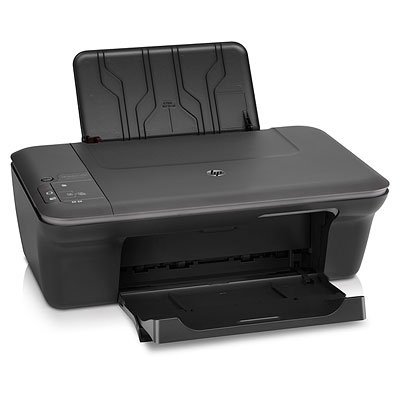
Ominaisuudet
- Tulostustekniikka
- Mustesuihku
- Suositeltu enimmäis sivumäärä kuukaudessa
- 250 sivua kuukaudessa
- Tulostusnopeus (musta, normaalilaatu, A4/US Letter)
- 5,5 ppm
- Vakiosyöttökapasiteetti (arkkia)
- 60 arkkia
- Vakiotulostuskapasiteetti
- 25 arkkia
Arvostelut
Arvostele tuoteTuotetiedot
Tuote
- Valmistaja
- HP
- Tuotenimi
- Deskjet 1050 All-in-One Printer - J410a
- Julkaisupäivä
- 03.06.2010
Tuotekoodit
- Valmistajan tuotekoodit
- CH346C
Performance
- Print technology
- Inkjet
- Maximum duty cycle
- 250 pages per month
- Number of print cartridges
- 2
- All-In-One-multitasking
- Ei
- Printing colours
- 4
Printing
- Print speed (black, normal quality, A4/US Letter)
- 5.5 ppm
- Print speed (colour, normal quality, A4/US Letter)
- 4 ppm
- Print speed (black, draft quality, A4/US Letter)
- 16 ppm
- Print speed (colour, draft quality, A4/US Letter)
- 12 ppm
- Standard printer languages
- HP PCL 3 GUI
- Print speed (black, best quality, A4)
- 1.5 ppm
Copying
- Copy speed (normal quality, colour, A4)
- 2.5 cpm
- Maximum number of copies
- 10 copies
- Copy speed (US Letter, colour, normal)
- 2.5 cpm
- Copy resolution (black graphics)
- Up to 600 optimized dpi (from 300 dpi input)
- Copier settings
- Stand-alone copying
- Time to first copy (letter)
- <18 sec
Scanning
- Maximum scan area
- 216 x 297 mm
- Scan type
- Flatbed
- Input colour depth
- 24 bit
- Gray scale levels
- 256
- TWAIN version
- Version 1.9
- Scan technology
- CIS
- Scan input modes
- Front-panel scan
Input capacity
- Standard input capacity
- 60 sheets
- Maximum input capacity
- 60 sheets
- Input capacity for envelopes (primary tray)
- 5 sheets
- Maximum input capacity for envelopes
- Up to 5 envelopes
- Maximum input capacity for labels
- Up to 10 sheets
- Maximum input capacity for transparencies
- 15 sheets
- Standard input capacity for cards
- Up to 20 cards
- Standard input capacity for transparencies
- Up to 15 sheets
- Maximum input capacity for 10 x 15 cm photographs
- 20 sheets
Output capacity
- Standard output capacity
- 25 sheets
- Maximum output capacity
- 25 sheets
- Standard output capacity for cards
- Up to 20 cards
Paper handling
- Envelope feeder
- N
- Maximum input capacity for cards
- Up to 20 cards
- Media handling
- Sheetfeed
- Maximum paper trays
- 1
- Paper handling standard/input
- 60-sheet input tray
- Paper handling standard/output
- 25-sheet output tray
Display
- Display
- None
Ports & interfaces
- Direct printing
- Ei
- Standard interfaces
- USB 2.0
- PictBridge
- Ei
Power
- Power consumption (typical)
- 10 W
Operating system/software
- Drivers included
- HP PCL 3 GUI
System requirements
- Minimum system requirements
- Mac OS X v 10.5 or v 10.6: PowerPC G4, G5 or Intel Core processor; 256 MB RAM; 300 MB available hard disk space; CD-ROM/DVD drive or Internet connection; USB port
Certificates
- Energy Star certified
- Kyllä
- Electromagnetic compatibility
- CISPR 22: 2005+A1: 2005+A2: 2006/EN 55022: 2006+A1: 2007 Class B, CISPR24: 1997+A1: 2001+A2: 2002/EN 55024: 1998+A1: 2001+A2: 2003, EN 61000-3-2: 2006, EN 61000-3-3: 1995+A1: 2001+A2: 2005, FCC CFR 47 Part 15 Class B, ICES-003, Issue 4 Class B, CCC S&E (China)
Weight & dimensions
- Weight
- 3600 g
- Package weight
- 5220 g
Operational conditions
- Storage temperature (T-T)
- -40 - 60 °C
- Operating temperature (T-T)
- 5 - 40 °C
- Recommended humidity operating range
- 15 to 80% RH
Other features
- Standard input trays
- 1
- Dimensions (WxDxH)
- 427 x 406 x 249 mm
- Power requirements
- Input voltage 100 to 240 VAC (+/- 10%), 50/60 Hz (+/- 3 Hz)
- Media types supported
- Paper (brochure, inkjet, plain), photo paper, envelopes, labels, cards (greeting), transparencies
- Standard output capacity for transparancies
- 10 sheets
- Print head
- 2 (1 black, 1 Tri-color)
- Safety
- IEC 60950-1: 2005/EN 60950-1: 2006; Compliance CE Marking (Europe), certified by Canada CSA; NOM-NYCE (Mexico); CCC S&E (China); GOST (Russia)
- Borderless printing
- N
- Compatible operating systems
- Microsoft Windows 7, Windows Vista, Windows XP (SP2)* or higher (32-bit only); Mac OS X v 10.5 or v 10.6
- Functions
- Print, copy, scan
- Print quality, vertical alignment accuracy
- +/- 0.0051 mm
- Colour faxing
- Ei
- Colour scanning
- Kyllä
- Hardware scan resolution
- 1200 x 1200 DPI
- Colour copy capability
- Kyllä
- Package dimensions (WxDxH)
- 463 x 193 x 349 mm
- Acoustic power emissions
- 6.3 B(A) (printing at 6 ppm)
- Acoustic pressure emissions
- 50 dB
- Compatible ink types, supplies
- Dye-based (color); pigment-based (black)
- Duplex print options
- None (not supported)
- Pallet dimensions (W x D x H)
- 1219 x 1016 x 2570 mm
- Pallet weight
- 459 kg
- Print quality (colour, best quality)
- 4800 DPI
- Standard media sizes
- A4; B5; A5; A6; DL envelope
- Minimum system requirements for Macintosh
- Mac OS X v 10.5 or v 10.6: PowerPC G4, G5 or Intel Core processor; 256 MB RAM; 300 MB available hard disk space; CD-ROM/DVD drive or Internet connection; USB port
- Maximum dimensions (W x D x H)
- 427 x 470 x 249 mm
- Print margin bottom (A4)
- 14.5 mm
- Print margin left (A4)
- 3.2 mm
- Print margin right (A4)
- 3.2 mm
- Print margin top (A4)
- 1.5 mm
- Image scaling/enlargement range
- 12 to 1200% in 1% increments at 300 dpi resolution (scaling range dependent upon resolution)
- Transparency adapter
- N
- Automatic paper sensor
- N
- Dimensions with trays up
- 427 x 306 x 156 mm (trays closed)
- Maximum scan area
- 8.5 "
- Camera phone
- N
- Maximum output capacity for transparencies
- 10 sheets
- Photo proofsheets supported
- N
- Print head nozzles
- 336 for black, 612 for Tri-color
- SureSupply supported
- Y
- Video action printing supported
- N
- Scan resolution enhanced disclaimer (short)
- What is the maximum resolution at which I can scan? HP Scanjet scanning systems will allow you to specify a resolution of up to 999,999 enhanced dpi. In addition, by using lower dpi and high scale factors (enlarging the image using dimension or re-size tool), you can achieve a very high enhanced dpi. However, it is important to note that the maximum resolution that can be actually achieved depends upon various factors, including computer speed, available disk space, memory, the size of the image being scanned, and bit depth settings. Thus, depending on your system and what you are scanning, you may not be able to scan at certain resolutions. For example, using the same image and same dpi, scanning in 24-bit color requires at least 24 times more memory (in the form of hard disk space and available memory) than scanning in 1-bit black and white. In addition, the size of the area being scanned is very important.